
文章阅读目录大纲
Like the original R language it does, the R# system just provides a runtime to running the R# script program and the framework to attatch the external library modules code to extends the function of the entire R# system. Most of the data scientific function(example like scientific data file read/write, math function, clustering function, graphics plot function) in R# is implemented at 3rd part library. There are two kind of the package type in R# system:
- Single dll package module
- Nuget liked zip source package
Now, lets start to learn about these two kind of the package type that we could build for the R# system.
1. Create a single .NET dll package module
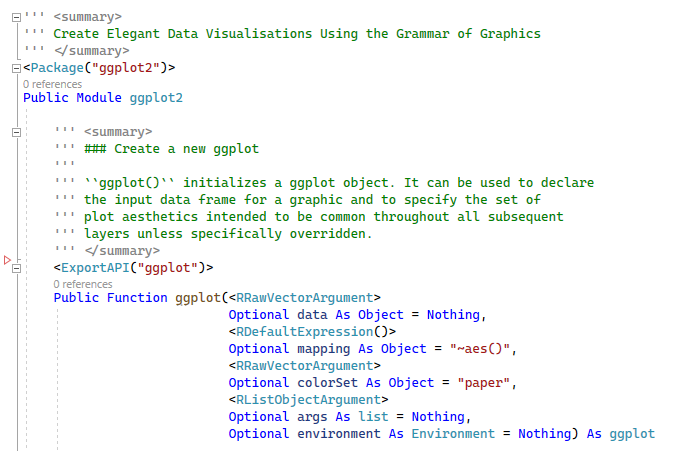
For create a single .NET dll package module, you just needs to tag some custom attribute for R#

as you can see on the above screenshot of the demo code, we have two kind of custom attributes that is required for tag on the code of your dll module:
PackageAttributeC#.ExportAPIAttribute
Metaprogramming in R# package
except those two custom attribute that we mention above for create a package module, there are another custom attributes that can be used in the dll mdoule development for modify the behaviour of R# interpreter:
Mark dll module as R# package
there is a special custom attribute that can be apply on the assembly object. RPackageModule
such custom attribute is useful when we generate the help document for our dll mdoule.
Module startup
zzz.vb or zzz.cs and then there is a static method named onLoad inside the zzz module, then it will be treated as the startup module in your dll module file.
Note about function parameters
There are some kind of special parameter types in R# system:
- RRawVectorArgumentAttribute
How to install the dll module
assuming that we have the R# system install at a directory location, then your dll package module can be put on some special location liked:
| .../bin/<R# runtime it is>
| .../bin/library/your.dll
| .../bin/Library/your.dll
| .../bin/your.dll
+ /library/your.dll
+ /Library/your.dll
Use the dll module in R# script
based on the situation of your .NET dll module file is registered inside the R# package system or not, then we have two method for attatch the dll package module into the R# runtime:
for a .NET dll package module is already registered inside the R# package system, then we can load a specific package module inside the dll file directly via the require or library
# the require function accept a static package
# name symbol which means you can not change the
# package target at runtime.
require(JSON);
# the library function accept a character vector
# for attatch the target packages, which means
# you can put a variable symbol at here to change
# the package target at runtime.
library("JSON");
for a .NET dll package module that didn't register into the R# package system, then we use the imports
# for imports some specific package module
# inside a dll file
imports "package" from "dllfile";
# imports multiple package modules at once
imports ["pkg1", "pkg2", "pkg3"] from "dllfile";
# imports all package modules inside the given dll file
imports "*" from "dllfile";
the dllfile
2. Create a nuget liked zip source package
the R# system also supports install a package in zip archive format, such package is kind of the original R package liked, contains various files inside this package archive:
- data: any kind of the asset files or resource file of the R# package
- assembly: the .NET dll package module
- R: the R# source script
The source project directory layout
For create such source package for R# system, we recommended that start with the R# function package.skeleton
package.skeleton(name='demoPackage', path = '/demo/pkg_test')
# Creating directories ...
# Creating DESCRIPTION ...
# Creating NAMESPACE ...
# Creating Read-and-delete-me ...
# Saving functions and data ...
# Making help files ...
# Done.
# Further steps are described in '/demo/pkg_test/demoPackage/Read-and-delete-me'.

# $ ls -l
# total 3
# -rw-r--r-- 1 Administrator 197121 296 Aug 10 21:56 DESCRIPTION
# -rw-r--r-- 1 Administrator 197121  33 Aug 10 21:56 NAMESPACE
# drwxr-xr-x 1 Administrator 197121   0 Aug 10 21:56 R/
# -rw-r--r-- 1 Administrator 197121 426 Aug 10 21:56 Read-and-delete-me
# drwxr-xr-x 1 Administrator 197121   0 Aug 10 21:56 data/
# drwxr-xr-x 1 Administrator 197121   0 Aug 10 21:56 man/
the function invoke that show above that will create a blank source project folder that contains the necessary project files to run a R# package build:
- DESCRIPTION: the file that contains the necessary meta data about the R# package
- NAMESPACE: a file that defines the rules for export function from current R# package
base on the two file that we could build a basically(or blank) R# package without any code or data, it can be loaded in the R# runtime.
details about the DESCRIPTION file
The DESCRIPTION file is a kind of vbproj liked metadata file: all of the required package metadata information is contains in this metadata file, example as:
Package: ggplot
Type: Package
Title: Create Elegant Data Visualisations Using the Grammar of Graphics
Version: 1.0.0.1254
Date: 2021-01-25
Author: xieguigang
Maintainer: xieguigang <gg.xie@bionovogene.com>
Description: A R language ggplot2 package liked grammar of
    graphics library for R# language programming.
License: MIT
RoxygenNote: 7.1.1
The example metadata about target R# source package will be transform as the nuget package metadata file and index json file when we build a new zip package file:
<?xml version="1.0" encoding="utf-8"?>
<package xmlns:xsi="http://www.w3.org/2001/XMLSchema-instance" xmlns:xsd="http://www.w3.org/2001/XMLSchema" xmlns="http://schemas.microsoft.com/packaging/2013/05/nuspec.xsd">
   <metadata>
      <id>ggplot</id>
      <title>Create Elegant Data Visualisations Using the Grammar of Graphics</title>
      <version>1.0.0.1254</version>
      <authors>xieguigang</authors>
      <requireLicenseAcceptance>true</requireLicenseAcceptance>
      <license type="expression">MIT</license>
      <description>A R language ggplot2 package liked grammar of
    graphics library for R# language programming.</description>
      <copyright>MIT</copyright>
      <dependencies>
         <group targetFramework="net6.0">
            <dependency id="ggplot2" version="1.0.0.0" exclude="Build,Analyzers" include="ggplot" />
            <dependency id="ggplot3" version="1.0.0.0" exclude="Build,Analyzers" include="ggplot" />
         </group>
         <group targetFramework="net6.0">
            <dependency id="ggraph" version="1.0.0.0" exclude="Build,Analyzers" include="ggraph" />
            <dependency id="ggforce" version="1.0.0.0" exclude="Build,Analyzers" include="ggraph" />
         </group>
      </dependencies>
      <frameworkAssemblies>
         <frameworkAssembly assemblyName="ggplot" targetFramework="net6.0" />
         <frameworkAssembly assemblyName="ggraph" targetFramework="net6.0" />
         <frameworkAssembly assemblyName="Microsoft.VisualBasic.Data.ChartPlots" targetFramework="net6.0" />
         <frameworkAssembly assemblyName="Microsoft.VisualBasic.Data.Framework" targetFramework="net6.0" />
         <frameworkAssembly assemblyName="Microsoft.VisualBasic.Data.GraphTheory" targetFramework="net6.0" />
         <frameworkAssembly assemblyName="Microsoft.VisualBasic.Data.visualize.Network" targetFramework="net6.0" />
         <frameworkAssembly assemblyName="Microsoft.VisualBasic.Data.visualize.Network.IO.Extensions" targetFramework="net6.0" />
         <frameworkAssembly assemblyName="Microsoft.VisualBasic.Data.visualize.Network.Visualizer" targetFramework="net6.0" />
         <frameworkAssembly assemblyName="Microsoft.VisualBasic.Imaging" targetFramework="net6.0" />
         <frameworkAssembly assemblyName="Microsoft.VisualBasic.Imaging.Physics" targetFramework="net6.0" />
         <frameworkAssembly assemblyName="Microsoft.VisualBasic.Math.Core" targetFramework="net6.0" />
         <frameworkAssembly assemblyName="Microsoft.VisualBasic.Math.Statistics.ANOVA" targetFramework="net6.0" />
         <frameworkAssembly assemblyName="Microsoft.VisualBasic.Math.Statistics" targetFramework="net6.0" />
         <frameworkAssembly assemblyName="Microsoft.VisualBasic.MIME.Html" targetFramework="net6.0" />
      </frameworkAssemblies>
      <language>en-US</language>
   </metadata>
</package>
the xml metadata file is located at the root directory of your zip package, and its content can be parsed and index in nuget package system. the file name of this xml metadata file is usually be the package_name.nuspec. the metadata json file is located at the built zip package file package/index.json
{
  "Author": "xieguigang",
  "Date": "2021-01-25",
  "Description": "A R language ggplot2 package liked grammar of\r\n    graphics library for R# language programming.",
  "License": "MIT",
  "Maintainer": "xieguigang <gg.xie@bionovogene.com>",
  "Package": "ggplot",
  "Title": "Create Elegant Data Visualisations Using the Grammar of Graphics",
  "Type": "Package",
  "Version": "1.0.0.1254",
  "meta": {
    "RoxygenNote": "7.1.1",
    "builtTime": "9\/10\/2022 9:45:20 PM",
    "os_built": "Microsoft Windows NT 10.0.19044.0"
  }
}
Magic trick about package startup
zzz.R and named .onLoad method
# zzz.R

const .onLoad = function() {
   # you can write the startup message of your package at here
   # do some package environment initialization operation
}
For example, you can config the runtime constant/options/required package loading at this package startup function. So you can make your R# package code structure more elegant by utilizing this special startup function.
Build package
You can run build of the zip package that we learn above via the Rscript
Rscript --help --build

# '--build' - build R# package
# Usage:
#
#    Rscript --build [/src <folder, default=./> --skip-src-build /save <Rpackage.zip>]
#
the --build
/src--skip-src-build/save
Install package
Both of the .NET dll package module or the zip archive package that we learn above can be installed into the R# system via the R# --install.packages from the commandline or the install.packages
install from the commandline
For install the package modules from the commandline, that we can use the --install.packages
R# --help --install.packages

# '--install.packages' - Install new packages
# Usage:
#
#  R# --install.packages /module <*.dll/*.zip> [--verbose]
#

# example as
R# --install.packages "/path/to/package.zip"
R# --install.packages "/path/to/library.dll"
NOTE:
- the commandline switch
/module - the library location of the zip package its installation result is different between the Windows and UNIX environment. On windows environment, the library location that you package installed will be in the directory of the current drive:
<drive_letter>:\etc\r_env\library/etc/r_env/library. - the dll module file is recommended copy to the
bin
install from the script function
despite install the R# package module file from the commandline, we also can accomplish such module installation work at script runtime via the install.packages
install.packages("/path/to/package.zip");
install.packages("/path/to/library.dll");
- 单细胞视角下的微生物基因组代谢酶嵌入分析 - 2026年2月25日
- 基因组代谢酶层级嵌入 - 2026年2月23日
- 基因组功能吉布斯LDA主题建模 - 2026年2月23日


No responses yet